Hosting
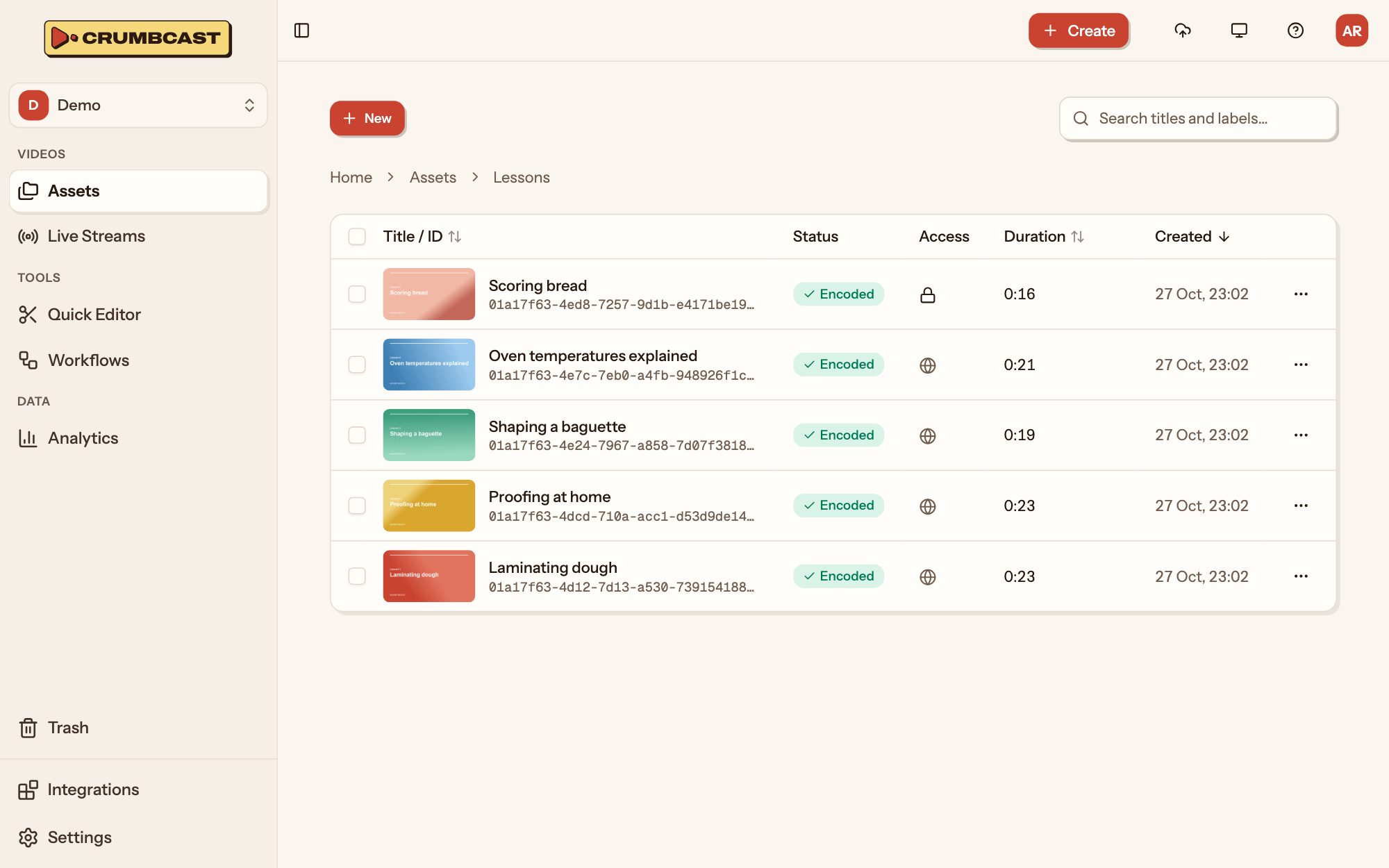
Upload or import videos and keep them in folders, with thumbnails, storyboards and GIFs, in our storage or yours.
What's included
- Upload, or import from a linkDrop files into the dashboard, or paste a link and Crumbcast fetches the video for you.
- Folders and labelsSort videos into folders and tag them with labels, so any video in a big library is quick to find.
- Thumbnails and storyboardsA thumbnail for every video, and storyboards that preview each moment as viewers scrub the timeline.
- GIFs from any momentTurn a few seconds of any video into a GIF to share.
- Your own S3 storageKeep videos in any S3-compatible bucket of yours, or use ours. Files stay in the bucket you set.
- Screen recordingsRecord a screen, a window or a tab, with your camera in a corner, and it uploads by itself.
- Your Vimeo or YouTube libraryConnect the account and pick the videos to bring over, with their titles, descriptions and thumbnails.
- A trash for second thoughtsDeleted videos wait in the project's trash, ready to restore, for as long as you choose.
From file to library
Bring it in
Upload from the dashboard or your code, record your screen, paste a link, or bring videos over from Vimeo or YouTube.
File it
Give it a folder and labels, or move and label many videos at once.
Keep it where you choose
In our storage or in a bucket of yours, picked for each video or set as the project's default.
The specifics
- Uploads
- In parts, straight to storage, each retried alone
- Imports
- From a link, or a connected Vimeo or YouTube account
- Storage
- Ours, or any S3-compatible bucket
- Thumbnails
- A frame of the video, or a JPEG, PNG or WebP up to 10 MB
- GIFs
- Any part of a video, 480 px wide and 15 frames a second unless you ask for others
- A new file
- Same ID, links and settings
import { Crumbcast } from "crumbcast"; const crumbcast = new Crumbcast({ token: process.env.CRUMBCAST_TOKEN, baseUrl: "https://your-crumbcast",}); // file: a browser File, or fs.openAsBlob(path) in Node// In parts, straight to storage; then encoding startsconst video = await crumbcast.uploadVideo(projectId, file, { title: "Launch day",}, { onProgress: (part) => show(part.uploaded / part.total),}); // Or have Crumbcast fetch it from a linkawait crumbcast.videos.importVideo({ project_id: projectId, importVideoRequest: { url: "https://example.com/launch.mp4", title: "Launch day", },});On Free and on Pro
Start on Free, and move up when you need what it doesn't have. From $10 a month, plus what you use.
| What changes | Free | Pro |
|---|---|---|
| Storage | 120 minutes | 1,000 minutes, then billed |
| Longest video | 10 minutes | No limit |
| Your own storage | Not included | Not included |
| Vimeo, YouTube, Twitch and Zoom | Not included | Included |
| Trash | Not included | Included |
| Projects | 1 | No limit |
Who it's for
Media and publishers
A video library for your newsroom or channel, embedded in every article and measured to the second.SaaS and developers
Video inside your own product: upload from your app, react to webhooks, and decide who watches from your backend.Agencies and studios
Video for many clients from one account: a project each, with its own players, workflows and storage, and one bill.
Questions
Can I replace a video's file and keep its links?
Yes. The new file takes the old one's place with the video's ID, links and settings kept, and the video plays as it was until the new file is encoded.
What if an upload stops halfway?
Files go up in parts, and each part can be tried again by itself, so nothing already sent is lost.
Does my own bucket need anything special?
It has to be S3-compatible. Signed, password, encrypted or forensic videos also need a storage without a public URL, so their files can't be fetched around the checks.
More products
Your first video is one drop away
Start on the Free plan, and move up when you need more.
Free includes 120 stored minutes and is never billed.