Access and permissions
Two kinds of access meet in Crumbcast: who may manage a project's videos (its members, and the API tokens they make), and who may watch them (anyone, or only the viewers you let in). This page covers both, and what keeps a video's files from going further than you meant.
Who manages a project
Each member of a project has a role in it:
| Role | May |
|---|---|
viewer | See its videos, live streams, folders, labels, workflows and analytics |
editor | Also upload, import, change and delete videos; folders, labels and workflows; run live streams |
admin | Also its settings: signing keys, players, watermarks, webhooks, connected channels, API tokens and members |
An organisation's admins are admins of every project in it. Members, roles and organisations are managed in the dashboard only.
API tokens
Your code acts through a project's API token, which a project admin makes in its Settings → API tokens. A token has a role of its own, and never more than its maker has in the project now; it works in that project only. See Authentication for making and sending one.
What a token may not do answers:
401 | No token, or one that's expired or revoked, or whose maker has left the project |
403 | Too low a role for this, or something no token may do (the project's members and tokens, your account, the organisation, its storages and billing) |
404 | Another project's video, live stream or anything else, as if it weren't there |
402 | Something the organisation's plan doesn't have; the answer says which plan has it |
Make a token for each thing that uses it, with the lowest role that does: a viewer
token for a dashboard that only reads analytics, an editor one for your upload
pipeline. Then one can be revoked without stopping the others.
Who may watch
Each video and live stream has a playback_policy:
| Policy | Who may watch |
|---|---|
public | Anyone with its link |
signed | Only with a viewer link (below), or a playback token your backend makes for each viewer (below) |
password | Anyone who gives its password |
Viewer links
The simplest way to let someone watch a signed video, live stream or playlist, without a
backend: make them a viewer link on its Share tab in the dashboard. Name who it's for
(optional) and when it expires (or never), and send them the link. It plays only for whoever
has it, until it expires or you delete it. Deleting it stops it at once.
Who it's for is its viewer: with a forensic watermark, a copy that leaks leads back to them.
A project's editors can also make them with the API:
curl https://your-crumbcast/api/v1/projects/$PROJECT_ID/viewer-links/ \
  -H "Authorization: Bearer $CRUMBCAST_TOKEN" \
  -H "Content-Type: application/json" \
  -d '{"video_id": "'$VIDEO_ID'", "viewer": "Acme Corp", "expires_in_days": 30}'
The answer's token goes on the video's links as ?token= (below).
Give live_stream_id or playlist_id in place of video_id for those. DELETE /api/v1/viewer-links/{id}/ ends one.
Signed playback
To let viewers in from your own site, your backend makes a playback token for each one: you decide who may watch, and for how long.
1. Make a signing key
With an admin token:
curl https://your-crumbcast/api/v1/projects/$PROJECT_ID/signing-keys/ \
  -H "Authorization: Bearer $CRUMBCAST_TOKEN" \
  -H "Content-Type: application/json" \
  -d '{"name": "Website backend"}'
{
  "id": "8c1d…",
  "name": "Website backend",
  "created_at": "…",
  "private_key": "-----BEGIN PRIVATE KEY-----\n…"
}
The private key is shown only now: Crumbcast keeps just its public half. Store it with your
backend's secrets. Its id is the key's ID, which every token names.
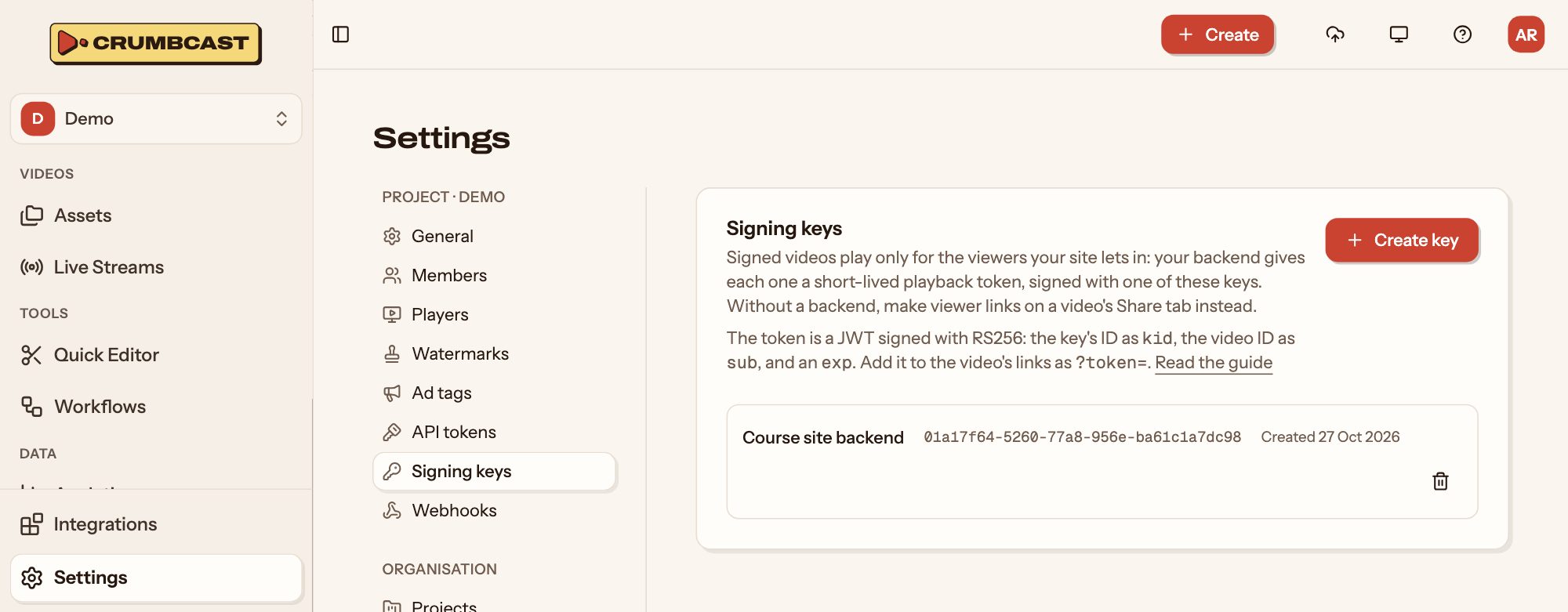
A project may have several keys; deleting one stops every token it signed. Its admins can also make them in the project's Settings → Signing keys:
2. Make a video signed
Create it with "playback_policy": "signed", or change one:
curl -X PATCH https://your-crumbcast/api/v1/videos/$VIDEO_ID/ \
  -H "Authorization: Bearer $CRUMBCAST_TOKEN" \
  -H "Content-Type: application/json" \
  -d '{"playback_policy": "signed"}'
3. Sign a token for each viewer
A playback token is a JWT signed with RS256, with:
| Where | Claim | |
|---|---|---|
| header | kid | The signing key's id |
| payload | sub | The video's ID (or the live stream's, or the playlist's) |
| payload | exp | When it stops working; required. Keep it short: minutes to hours |
| payload | viewer | Optional: who's watching, for a forensic watermark to mark their copy |
import jwt from "jsonwebtoken";

const token = jwt.sign(
  { sub: videoId, viewer: user.id },
  process.env.CRUMBCAST_SIGNING_KEY,
  { algorithm: "RS256", keyid: process.env.CRUMBCAST_KEY_ID, expiresIn: "1h" },
);
import time

import jwt  # PyJWT

token = jwt.encode(
    {"sub": video_id, "viewer": str(user.id), "exp": int(time.time()) + 3600},
    signing_key,
    algorithm="RS256",
    headers={"kid": key_id},
)
4. Add it to the link
Put the token on the link as ?token=:
https://your-crumbcast/watch/<video id>?token=<token>
https://your-crumbcast/embed/<video id>?token=<token>
https://your-crumbcast/api/v1/videos/<video id>/master.m3u8?token=<token>
The watch page, the embedded player and the HLS playlist (for another player) all take it. Without a token, or with one that's expired, for another video or signed with a key that's gone (or a viewer link that's deleted), the video doesn't play.
Password
curl -X PATCH https://your-crumbcast/api/v1/videos/$VIDEO_ID/ \
  -H "Authorization: Bearer $CRUMBCAST_TOKEN" \
  -H "Content-Type: application/json" \
  -d '{"playback_policy": "password", "password": "spring-launch"}'
The password is never answered back. On the watch page and in embeds, the player asks the
viewer for it. A player of your own asks Unlock Video for a
playback token with it, then plays the video's links with ?token=, as a signed video's:
curl https://your-crumbcast/api/v1/videos/$VIDEO_ID/unlock/ \
  -H "Content-Type: application/json" \
  -d '{"password": "spring-launch"}'
{ "playback_token": "eyJ…" }
It works until the password changes. A wrong password answers 401; too many from one
address, 429.
The project's own members watch any of its videos in the dashboard, whatever their policy. Embeds never use the viewer's login: an embedded signed video needs its token like anyone else's.
Where it may be embedded
A video's embed_domains list the sites its player may be embedded on: host names, and
*.example.com for a site's subdomains. With none, any site may. When a site is refused
that should be allowed, see Troubleshooting.
Keeping the files to who may watch
A policy decides who gets the player. What follows keeps the files themselves from playing anywhere else.
Storage
A signed or password video, or one that's encrypted or forensically watermarked,
needs a storage without a public URL, or one whose CDN serves only signed links
(CloudFront signed URLs or Bunny token authentication, set on the storage in the
dashboard): its files are then only ever handed out through short-lived signed links,
never at a lasting address. A change its storage can't keep answers 400. Setting up a
storage of your own, with or without a CDN: Storage and CDN.
Encryption
curl -X PUT https://your-crumbcast/api/v1/videos/$VIDEO_ID/protection/ \
  -H "Authorization: Bearer $CRUMBCAST_TOKEN" \
  -H "Content-Type: application/json" \
  -d '{"protection": "aes"}'
clear: its files as they are.aes: encrypted whole with AES-128, its key served only to who may watch, with its playlists. It plays over HLS only.drm: encrypted for DRM, played with a ClearKey licence, where your Crumbcast offers it (a video'sdrm_offeredsays). ClearKey is the browser's built-in key system: the key reaches the page, so it protects no more thanaes, and it doesn't play in Safari.
Changing it encodes every format again, and the video doesn't play until one is. Live
streams take clear or aes.
Watermarks
curl -X PUT https://your-crumbcast/api/v1/videos/$VIDEO_ID/watermarks/ \
  -H "Authorization: Bearer $CRUMBCAST_TOKEN" \
  -H "Content-Type: application/json" \
  -d '{"logo": true, "forensic": true}'
- Logo: one of the project's watermarks (an image, text, or both) burned into every
rendition;
logo_idpicks which, or the project's default without one. Admins make them in Settings → Watermarks, or with Create Watermark. - Forensic: each viewer's copy is marked as their own, invisibly. Name the viewer in
their playback token's
viewerclaim (Signed playback), and a copy that leaks can be traced back to them.
Like encryption, changing them encodes every format again.
To trace a leaked copy, upload it with Trace Leaked Copy and an
editor token. Once it's read, List Traces has its likeliest
viewers, best first, each with how well the copy agrees with their mark: the playback
token's viewer, a member's email, or an anonymous visitor's key.